The Problem
Ergomotion receives customer purchase orders from retailers worldwide — dozens of different PDF formats, each with different layouts, field names, and conventions. Every order needed to be manually read, extracted, validated, and entered into SAP to create a sales order.
The process was entirely manual and error-prone. The sales order team spent significant time on repetitive data entry instead of on work that required their judgment and expertise. The variety of incoming formats made traditional template-based automation impractical.
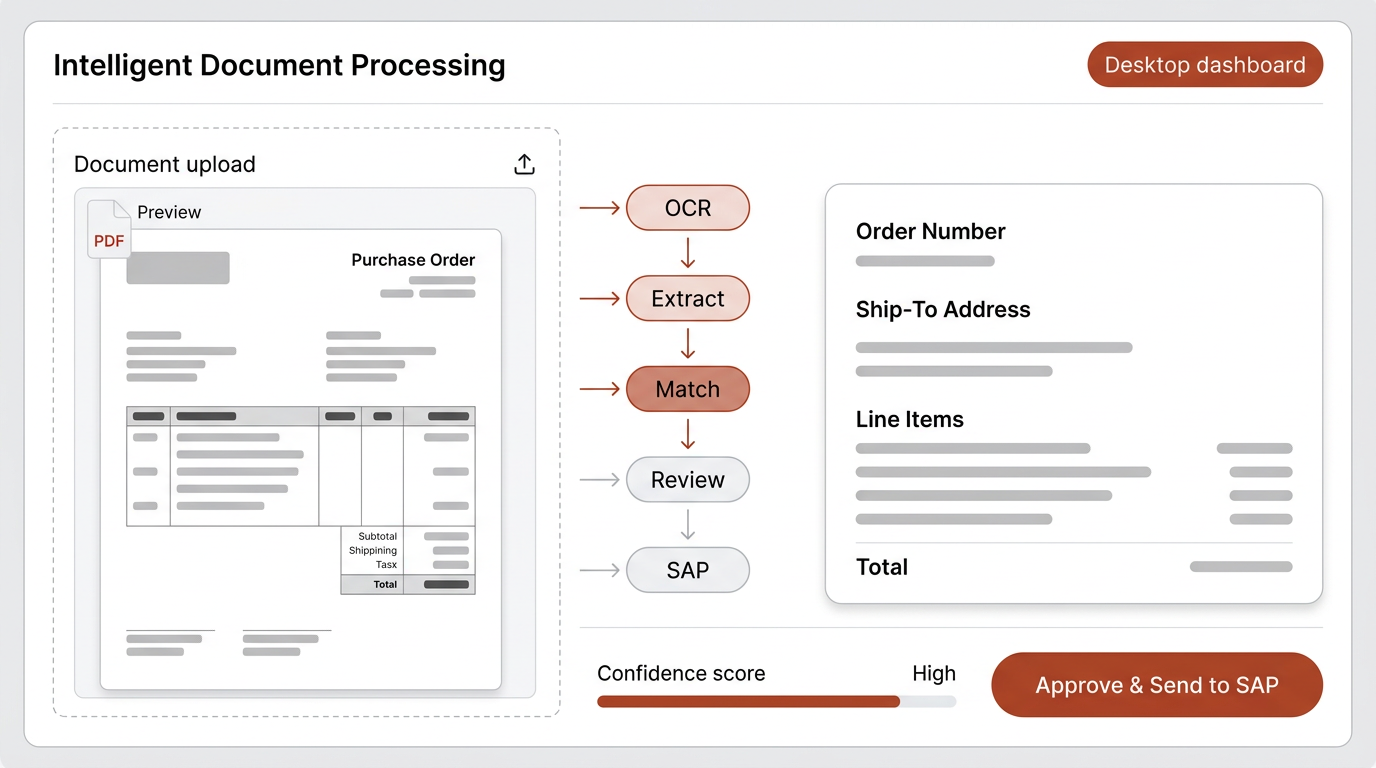
Understanding the Workflow
Before building anything, I spent time with the sales order team watching how they actually processed purchase orders. I observed their screen-by-screen workflow: opening the PDF, visually scanning for key fields, cross-referencing against SAP records, and manually typing each value.
Two things became clear. First, the team had developed mental shortcuts for recognizing different PO formats — they could glance at a document and know which retailer it came from and where to find each field. Second, the most time-consuming part was not reading the document, but the re-entry of data across systems. The cognitive work was relatively low; the manual labor was high.
This told me that a well-designed extraction pipeline could handle the bulk of the work, as long as it preserved a human review step for edge cases.
Approach: Right Model for Each Step
A common approach would be to send each document to a large, expensive language model and ask it to extract everything. I chose a different path — breaking the workflow into discrete steps and selecting the right tool for each one.
PDF ingestion and text extraction
OCR handles multi-page documents with page markers. No AI model needed — deterministic processing.
Structured data extraction
A language model trained with field synonyms across PO formats. It understands that "Ship To," "Delivery Address," and "Consignee" all mean the same thing. Built with Mistral — significantly cheaper than OpenAI or Anthropic while reliable for this structured task.
Address matching
A second, smaller model focused exclusively on address validation. Uses multi-factor scoring with postal code priority and a confidence threshold. The smaller model is cheaper and faster because address matching is a narrower task.
Human review
A review step where the team confirms extracted data before it enters SAP. This preserves human judgment for ambiguous cases and builds trust in the system.
The principle: rather than sending everything to one large, expensive model, each step uses the right tool and the right model. This makes the system more reliable, more debuggable, and significantly cheaper to operate.
Key Findings
People develop expertise that systems never capture.
The team's mental shortcuts for recognizing PO formats were valuable domain knowledge. I encoded these as field synonyms in the extraction model — turning tacit knowledge into system intelligence.
The biggest cost is not the AI model — it is using the wrong one.
By using Mistral for extraction and a smaller model for address matching, the per-document cost dropped dramatically compared to routing everything through a premium model. The accuracy stayed the same because each model was matched to its task complexity.
Human-in-the-loop is a feature, not a limitation.
The review step was not a compromise — it was what made the team trust the system. Knowing they had final say made adoption smoother and caught the occasional edge case that no model handles perfectly.
Broader Impact
The same workflow pattern was adapted for the accounts department to handle invoices and receipts, with the extraction model trained to recognize different document layouts. The architecture — discrete steps, right-sized models, human checkpoints — proved to be a reusable pattern across the organization.
The sales order team now spends their time on exceptions and relationship management rather than data entry. The system handles the volume; the people handle the judgment.
Constraints & Reflections
This project was built as a solo consultant with no access to the SAP development environment — integration was done through exported data formats rather than direct API connections. Given deeper system access, a direct SAP integration would reduce the remaining manual steps further.
The model training relied on a sample set of purchase orders from existing retailers. New retailer formats occasionally require manual review until the model encounters enough examples. A more robust solution would include an active learning loop where corrected extractions automatically improve the model over time.